Wardeye: the free extension that tells you which cards are on the table while you watch Riftbound on Twitch
Anyone who has watched a Regional Qualifier live knows the problem: the camera looks down on the table, the cards are small, and unless you know every illustration by heart you cannot tell who is playing what. Wardeye solves exactly that. It is a free extension for Chrome and Edge that, on Twitch, recognises the Riftbound cards on the table and writes each one’s name next to it; hover over one and it shows the full official card. Everything happens on your own computer, no video leaves the browser. It is a project Riftbound Zone collaborates on, and it is already on the Chrome Web Store. Here I explain what it does, how it works and what it does not do yet, based on the author’s documentation and the store screenshots.
What it doesA ward on the table
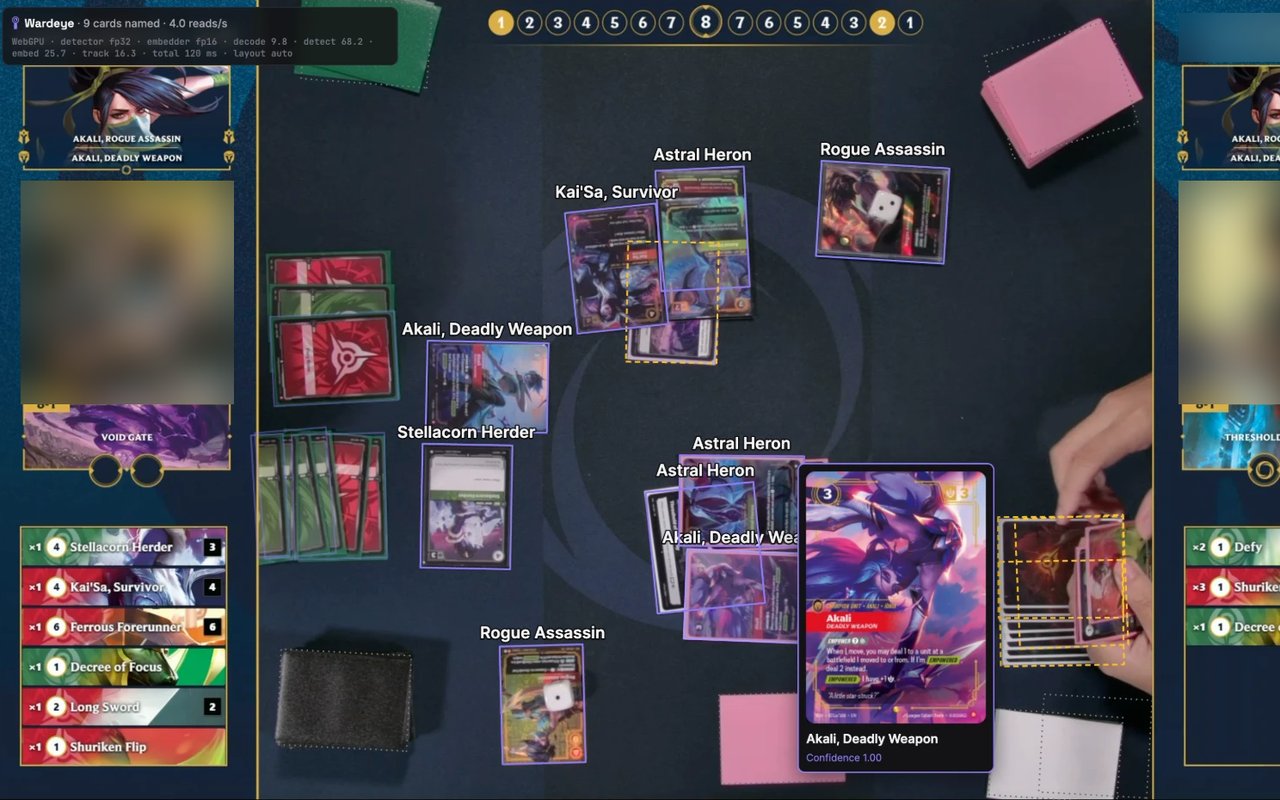
The motto is “Place the ward. See the table”, and it describes the thing well. Open a Riftbound stream or replay on Twitch, switch Wardeye on with the toolbar button or Alt+R, and the video gets outlines around the face-up cards with their names. In the screenshot above, taken from the store, you can see it all: Astral Heron, Kai’Sa, Survivor, Stellacorn Herder labelled on the table, and the Akali, Deadly Weapon card opened on hover, with the official image and the confidence level, in that case 1.00, full certainty.
What it does, one by one:
- Outlines and names the face-up cards on the table, live and in replays.
- Hover card: name, official image and recognition confidence.
- Remembers covered cards: when a card ends up under another, Wardeye knows what lies beneath.
- Plays panel, coming with version 0.2.1: for each player the Legend, the runes, the face-up cards and the sequence of plays in time order.
- Deck code: paste a player’s deck code and recognition narrows to their cards and gets more precise; the Legend alone already limits the search to the allowed domains.
- Three performance modes, Full, Balanced and Light, for more or less powerful computers, and three overlay styles: outlines with names, outlines only, or nothing until you hover.
- Works in theatre mode and fullscreen.
| Term | What it means |
|---|---|
| Extension | A small program added to the browser from the official store, in one click. You switch it on and off whenever you want. |
| Twitch | The platform where Riftbound is streamed, from Regional Qualifiers to community streamers. |
| Overlay | The layer drawn over the video: outlines, names, cards. It does not alter the stream, it covers it for you only. |
| Confidence | How sure the extension is about the name: 1.00 is full certainty, below 0.8 trust it less. |
| WebGPU | The browser technology that uses the graphics chip for computation. With WebGPU Wardeye is smooth and easy on the computer; without it, it runs on the processor and is slower. |
| Deck code | The text string that represents a whole deck, the same one our deck builder uses. |
| Alpha | An early version, working but with flaws and missing features: the honest way to say “try it and tell us what breaks”. |
| AGPL | The free licence of the code: anyone can read, change and redistribute it, as long as it stays free. |
How it worksA fingerprint for every illustration
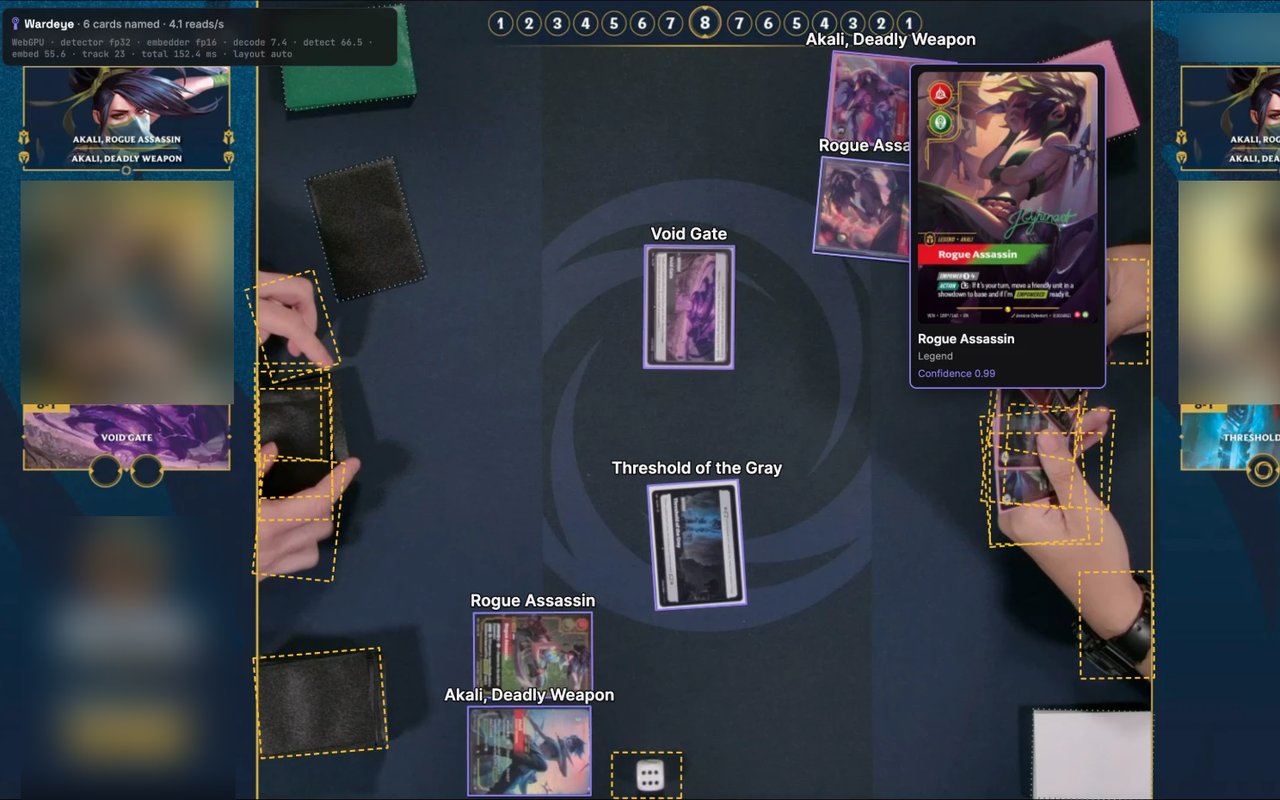
Wardeye does not read the card text, too small on a stream: it looks at the illustration. A first model finds the four corners of every card in the frame; a second turns the illustration into a numeric fingerprint; the fingerprint is compared with those of every printing in the game, variants included, and the closest wins. A tracking system follows cards as they move or stack. All of it runs locally: no server receives the video, there is no account, no statistics are collected.
The numbers the author reports, measured on three broadcasts kept out of training: the detector finds 97.6 percent of cards, on 5,465 cards checked by hand; the name is right between 96 and 99.4 percent of the time, depending on the broadcast. That is why the author always shows the confidence next to the name: when it is low, look at the card with your own eyes.

Who is behind itFederico Vietti, Gradeon and Riftbound Zone
Wardeye is developed by Federico Vietti, the developer of Gradeon, the AI card pre-grading app that is Riftbound Zone’s official sponsor. The extension shares Gradeon’s dark look but, as he writes himself, it is not a Gradeon product: it is a project of its own, free, with no ads, no paid features and no accounts. Until September it was called RiftEye.
Riftbound Zone collaborates on the community side: we collect bug reports and ideas from users in our Discord and bring them to the author, and the Italian streams listed on our streamers page are the testing ground for new versions. The code is public on GitHub under the AGPL licence; the trained models, the part that recognises the cards, stay proprietary and ship only with the store version. Like every community project, Wardeye uses Riot Games material under the “Legal Jibber Jabber” policy: Riot neither sponsors nor endorses it.
How to install itTwo minutes
- Open Wardeye’s page on the Chrome Web Store with Chrome or Edge, version 137 or later, on a computer: it does not work on phones.
- Press “Add” and, if you like, pin the icon to the toolbar.
- Open a Riftbound stream on Twitch and switch Wardeye on with the button or Alt+R (Option+R on Mac).
- If it stutters, switch to Light mode in the settings. The extension is light: the heavy lifting is done by the graphics chip through WebGPU.
Current store version: 0.1.2, marked alpha. Version 0.2.1 with the plays panel is on its way. There is no YouTube yet, and it is the first thing on the roadmap.
Why it matters here. Watching Riftbound live is the fastest way to learn the game and read the meta, but until now anyone who did not know the cards by heart was left behind. With Wardeye a beginner follows a Regional Qualifier like a veteran, and a veteran spots at once the new Radiance card a player has slipped into the deck. For Italian streamers it works the other way round: the audience understands what happens on the table without them reading every card aloud. We collect the reports, in the Discord: if something is not recognised, tell us there with a screenshot.
The short version
- Wardeye is a free Chrome and Edge extension that names the Riftbound cards on the table of Twitch streams, live and in replays.
- Outlines and names on the cards, hover card, covered cards tracked, deck code for extra precision; all local, no account, no video sent anywhere.
- 97.6 percent detection, names right 96 to 99.4 percent of the time in the author’s tests. WebGPU needed for speed.
- Author Federico Vietti, Gradeon’s developer; AGPL code on GitHub; Riftbound Zone collaborates by collecting community feedback.
- Store version 0.1.2, alpha; 0.2.1 with the plays panel coming.
Source: Wardeye on the Chrome Web Store, GitHub repository effe-exe/Wardeye and gradeon.ai/wardeye, consulted on October 3, 2026. Images: official store screenshots; cards by Riot Games.
Spotted an error?
To send a report you must first log in or sign up: it only takes a few seconds.